Microsoft alerts crypto users to a malicious Excel attack comparing OKX, Binance and Huobi fees
- Microsoft recently investigated a malicious Excel attack where the exploiter targeted crypto investors in Telegram chat groups.
- The bad actor weaponized an excel file with the name ‘OKX Binance & Huobi VIP fee comparison.xls’ and shared it with target users.
- The threat actor was identified as DEV-0139 and the weaponized excel gave the hacker a back door to the user’s system.

Microsoft investigated an exploit on crypto users by DEV-0139. The exploiter infiltrated Telegram chat groups to identify targets before sharing a malicious Excel file to gain backdoor access to their system.
Also read: Goldman Sachs to increase crypto stake after FTX exchange collapse
Microsoft investigates Excel attack targeted at crypto traders
Microsoft, an American multinational tech company recently investigated an attack that targeted crypto users. The bad actor DEV-0139 shared a malicious Excel file titled OKX Binance & Huobi VIP fee comparison.xls with crypto traders in messaging app Telegram groups. The intent was to gain back door access to their system through the Excel file.
The malicious user infiltrated chat groups on Telegram and masqueraded as a representative of a crypto investment firm. The attacker pretended to discuss trading fees with VIP clients of major exchanges Binance, OKX and Huobi.
According to investigators at Microsoft, the attacker would gain the trust of targeted victims, get them to share in-depth information, and then share a malicious file to gain access to their systems. The weaponized Excel file claimed to compare VIP tier fees across exchanges like OKX, Binance and Huobi. The file was well crafted and contained legitimate information about the current fees used by some crypto exchanges.
The metadata extracted showed that the file was created by a user called “Wolf”.
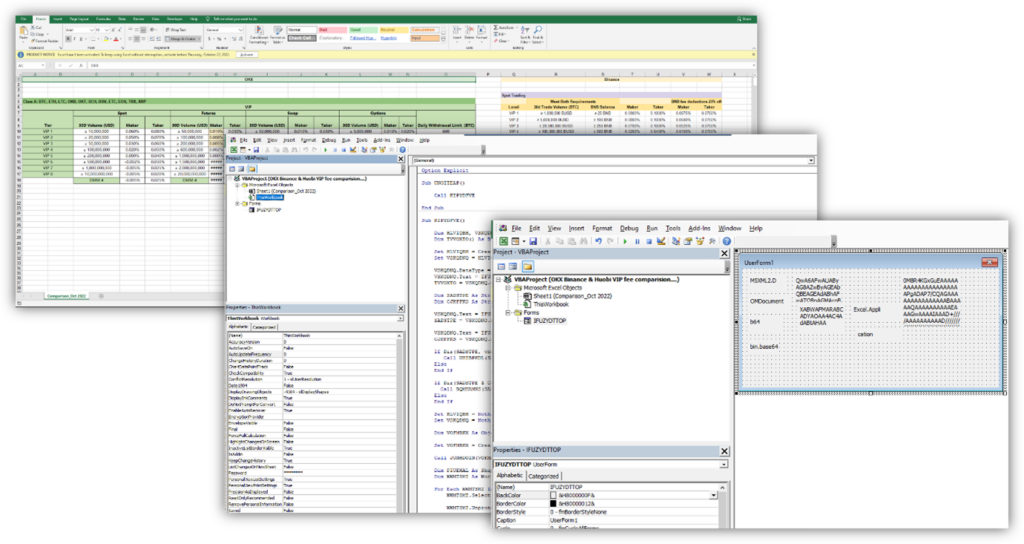
The information shared in the weaponized Excel file
Two of three files extracted from the malicious download opened a back door
Microsoft’s investigation revealed that two out of three files extracted from the original download, logagent.exe and wsock32.dll, were responsible for loading an encrypted backdoor. The following sections present Microsoft’s in-depth analysis of both files.
Once the file was loaded into the victim computer’s memory, it gave remote access to DEV-0139. At the time of analysis, Microsoft’s security intelligence team identified another variant of the attack and retrieved the payload. The identified malicious implants connected back to the same command-and-control C2 server that opens a backdoor in the user’s system.
Microsoft recommends fighting malicious Excel attacks in this manner
In the report published by the American software giant, the attack is classified as one targeted at crypto investment fund startups. Such companies are relatively new, but manage hundreds of millions of dollars and, therefore, are a magnet for cyber criminals.
DEV-0139 had broad knowledge of the cryptocurrency industry as well as the challenges that targeted victims may face, increasing the sophistication of the attack and its chances of success. The threat actor used Telegram, an app used by many in the crypto ecosystem and identified the profile of interested parties, before gaining the target’s trust by discussing relevant topics.
The exploiter then sent a weaponized document that delivered a backdoor through multiple mechanisms. Additionally, a second attack used a fake crypto dashboard application, to lure target users.
Microsoft recommends:
- Educating end users about protecting personal and business information in social media, filtering unsolicited communication (in this case, Telegram chat groups), identifying lures in spear-phishing email and watering holes, and reporting reconnaissance attempts and other suspicious activity.
- Educating end users about preventing malware infections, such as ignoring or deleting unsolicited and unexpected emails or attachments sent via instant messaging applications or social networks.
- Encouraging end users to practice good credential hygiene and make sure the Microsoft Defender Firewall (which is enabled by default) is always on to prevent malware infection and stifle propagation.
- Changing Excel macro security settings to control which macros run and under what circumstances when a workbook is opened.
- Stopping malicious XLM or VBA macros by ensuring runtime macro scanning by Antimalware Scan Interfaces (AMSI) is on.
- Turning-on attack surface reduction rules to prevent common attack techniques observed in this threat, by doing the following:
- Blocking Office applications from creating executable content.
- Blocking Office communication application from creating child processes.
- Blocking Win32 API calls from Office macros.
- Ensuring that Microsoft Defender Antivirus is up to date and that real-time behavior monitoring is enabled.
Author

Ekta Mourya
FXStreet
Ekta Mourya has extensive experience in fundamental and on-chain analysis, particularly focused on impact of macroeconomics and central bank policies on cryptocurrencies.