Placing a Vertical Spread with TradeStation
Many Online Trading Academy students are both new to the TradeStation platform and are also unfamiliar with its functionality. Often they ask me how to execute a certain option spread trade; hence, in this article, I will solely focus on the execution of a vertical spread trade. This example is for educational purposes only and should not be considered at any time as a trade suggestion.
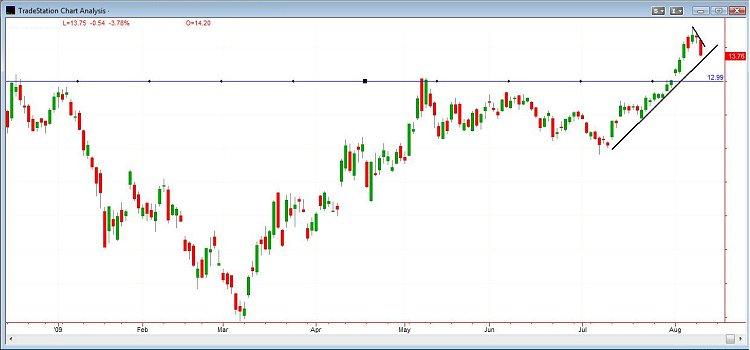
For simplicity's sake, I will start by analyzing an undisclosed product and drawing some support and resistance lines on it that I will later utilize in my strike price selection. Figure 1 below shows the product where it was trading at the time of the writing of this newsletter: at 13.76 with strong resistance at 12.99 which had been broken and later became support. I am quite aware of the two opposing forces that are acting upon the product, the bulls and bears, and I feel that the 13 level zone is going to act as a strong support if the price continues to go down. My forecast for the stock is that it will close above 13 by September expiry.
Next, let us look at the option chain for September with the intention of selling the 13 put and buying the 12 put. If I sell the Sep 13 put, I really expect to see the price at expiry above 13. When zoomed in only on those 2 puts, we can observe that the 13 put has a Bid of 0.38 and an Ask of 0.40, whereas the 12 put has a Bid of 0.16 and an Ask of 0.19. The actual transaction should state BTO + 10 Sep 12p @ 0.19 and STO – 10 Sep 13 p @ 0.38 producing a credit of 0.19 while risking the amount of 0.81 due to the fact that the spread between the 13 put and the 12 put is exactly one dollar.
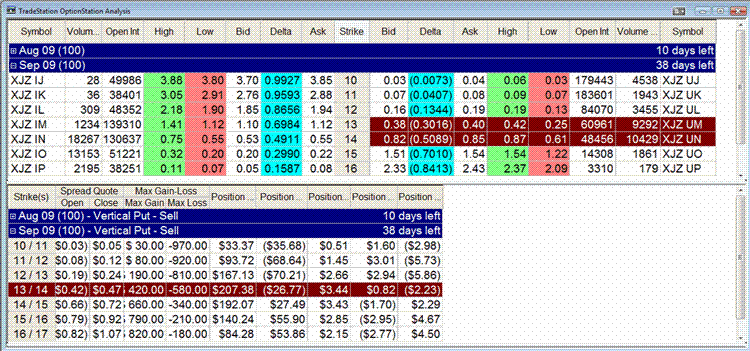
Figure 2 is a snapshot of TradeStation's options chain at the top, and the options spread pane on the bottom. The highlights in brown were supposed to represent the contracts that are involved in the transaction; notice that on the spread pane there is only one line highlighted, while on the option chain there are 2 lines highlighted, the two which were supposed to represent the two contracts of our spread. But wait! Can you observe a mistake in this figure? Are we looking at the correct spread? The 13-12 put spread? No. I have selected incorrectly. Be aware that it is easy to click on the wrong line when placing a trade on TradeStation and that is why we always need to proofread our orders.
On the spread pane it shows that I am performing the action of a Vertical Put – Sell. When I click the mouse on it, I have an option to "place order" and within that "place order" selection, I have two additional choices (1) To Open Position and (2) To Close Position. This is clearly shown in Figure 3 below.

Once I have selected the choice to place an order by opening a position, I still need to perform some specific adjustments. Those adjustments are shown in Figure 4.

Figure 4 shows the order which defaults to 10 contracts for both Sell to Open the Sep 2009 13 put and Buy to Open the Sep 2009 12 put. Observe that although the order type is Limit, the Limit Price is NOT specified, for the individual trader must enter the Limit price that he or she is willing to trade. If the trader wishes, he or she could take the price that is already specified in the box with the capital letter P next to the blank rectangle for the Limit Price. With a single click on the letter P, the Limit Price box will get filled with that very same amount, and only then can the trader proceed with placing the order. Many of my option students get stuck at this point for they attempt to send the order and the icon which appears on the platform states – Invalid Price. Certainly it is invalid for they have not even specified what the trading price should be. No wonder the order gets rejected by the platform.

Figure 5 shows the Confirmation Box, which asks the trader whether he or she is willing to proceed with placing the order. In our example, the order is asking us if we would like to sell at limit and receive 0.19 cents of credit. If we wish to proceed, then we would receive a credit of $190 for ten contracts. However, notice that our commission is going to be $20 dollars; therefore, we are never going to really see $190 dollars but only $170 in our account. The broker will take its commission from our future profit. The reason why the cost is $20 is that TradeStation charges one dollar per option contract and we have 10 on the long puts and 10 on the short puts. The last thing which is left for us to do after verifying the specifics is to place the trade and then to actively monitor it until the time of expiry.
In conclusion, I have walked you through the multiple steps which need to be taken on the TradeStation platform in order to place a Bull Put credit spread trade. TradeStation called the action taken a Vertical Put – Sell which is basically the same thing. I do suggest to the novice users of TradeStation to utilize the simulator during their learning process because execution involves multiple clicks and there is a good chance that mistakes could be made when entering a spread order. Use the simulator until the execution becomes natural to you. Have green trading.
Author

Online Trading Academy Team
Online Trading Academy