
FXCentrum Broker Review 2026: All you need to know

FXCentrum is an offshore-regulated CFD broker offering access to over 350 instruments across Forex, indices, commodities, bonds, stocks, and cryptocurrencies through its proprietary WebTrader platform and mobile app. They offer two spread-only accounts, with spreads starting from 1.6 pips on its Margin Bonus account, with leverage of up to 1000:1 and a low minimum deposit of $10.
The broker is regulated through the Financial Services Authority (FSA) of the Seychelles, which offers a basic level of oversight compared to that of top-tier regulators. FXCentrum still provides other key safeguards such as segregated client funds and negative balance protection, offering a degree of reassurance.
FXCentrum is clearly aimed towards retail traders looking for a simple and easy-to-use trading environment. Educational resources are limited and primarily suited to beginners, while 24/7 customer support is available. The account opening process is quick, requiring minimal information, and deposits are processed rapidly. Withdrawals can take longer, and it’s important for traders to understand the applicable conditions and any potential fees when managing their funds. FXCentrum has also expanded into the proprietary trading space through FXC Funded, allowing traders to access funded account-style programmes in addition to its standard brokerage services. This review focuses specifically on FXCentrum’s CFD brokerage services.
Account Conditions: Simple structure with a bonus-driven setup
FXCentrum offers a streamlined account structure built around two spread-only accounts. The Margin Bonus requires a low minimum deposit of $10, while the Scalping Margin Bonus – with more favourable pricing and slightly different terms – requires a significantly higher deposit ($10,000). The scalping account is positioned as their premium option. Both accounts operate without commissions and could appeal to traders looking for straightforward pricing. Spreads are slightly above industry average on most assets and, while there are no deposit fees, withdrawals are mostly subject to these costs.
Low $10 deposit on the Margin Bonus Account
Fees apply following a single free withdrawal per month
No swap-free accounts available
Account Types
- Margin Bonus: Offers a spread-only pricing structure with no separate commissions, requiring just a $10 minimum deposit. Spreads on Forex start at 1.6 pips with leverage up to 1000:1. The account is suitable for all traders, particularly those looking for simplicity with commission costs built into the spread. The margin bonus account also offers promotional bonuses when you open an account, which is one of the main features of trading with FXCentrum. No scalping is allowed on this type of account.
- Scalping Margin Bonus: Also operates on a spread-only basis, and is their premium account offering tighter spreads starting from around 1.0 pip. The minimum deposit requirement is significantly higher at $10,000. The maximum leverage on this account is 200:1 on Forex. While marketed towards more active or short-term traders, the higher capital requirement limits accessibility.
Account Types | Details |
|---|---|
Margin Bonus |
|
Scalping Margin Bonus |
|
- Demo Account: FXCentrum offers a demo account through its FXC Trader platform, providing access to a simulated trading environment that mirrors live trading conditions. Prices are based on live market feeds, and traders have access to the same charting tools, order types, and platform functionality as they would on a real account. There is no time limit for the demo accounts.
The demo account is designed to help users become familiar with the platform and test strategies without risking capital. Setup is straightforward via the registration process, with a virtual balance of $10,000 allocated upon creation. In most cases, users can open multiple demo accounts to test different approaches or conditions, depending on their needs - Islamic (Swap-Free) Account: They do not currently offer Islamic accounts.
Cost and fees
Costs and fees at FXCentrum are structured around a spread-only pricing model, with no separate commissions charged across its account types.
- Spreads:
Spreads are variable and tend to sit slightly above industry averages on major Forex pairs, typically around 1.6 pips, placing them at the higher end of the standard account range.
While some instruments, such as indices (e.g., US500) remain competitively priced, others, particularly gold, oil, and cryptocurrencies, show significantly wider spreads relative to industry benchmarks.
During our analysis, we have been unable to assess the spreads and live account conditions for the Scalping Margin account and have only assessed their demo environment.
Overall, FXCentrum’s pricing is straightforward but leans towards convenience over cost efficiency, making it more suitable for short-term traders and those who prefer a commission-free structure rather than the tightest possible spreads.
Account Types | Asset Class | Average Spreads | Commissions |
Margin Bonus Account | Forex - Majors | 1.6 pips | Commission-free |
Metals - Gold | 98 pips | ||
Indices - US500 | 65 pips | ||
Commodities - WTI Crude Oil | 22 pips | ||
Bonds - US 10 Year Note | 23 pips | ||
Stocks | Varies | ||
Crypto - BTC/USD | 4,200 pips | ||
Scalping Margin Account | Forex - Majors | 1.0 pips | Commission-free |
Note: Indicative values only – The spreads shown are indicative guidance and vary by account type, platform, instrument, market conditions, liquidity, and time of day. Headline figures do not always reflect the typical experience across asset classes.
Pricing Variations Across Assets: Commodities such as WTI Crude Oil trade with a spread of 22 pips ($0.22), while Gold has an average spread of 98 pips ($0.98). Indices such as the US500 have an average observed spread of 65 pips ($0.65), which is tighter than some regional indices; less-liquid products tend to have wider spreads.
Crypto Variation: Cryptocurrency spreads are often quoted in larger pip values because contract specifications and tick sizes are structured differently from the underlying price alone. For example, BTC/USD at 4,200 pips equates to approximately $42.00, making dollar-based comparison more relevant than pip size alone.
At the same time, lower-priced cryptocurrencies such as DOGE/USD can display large pip movements for relatively small changes in Dollar value. This means spreads can appear inconsistent across different crypto assets when viewed purely in pips. As such, assessing the actual Dollar cost provides a more consistent basis for comparison across instruments.
Full-spread information can be viewed in the FXCentrum trading station by looking at the symbols directly.
- Swap/Rollover fees:
Rollover fees apply to overnight positions and vary by traded instrument. Swaps are notably less competitive on major Forex pairs, with consistently negative overnight charges on both long and short positions. This makes the broker less suitable for swing or carry trading strategies. However, some assets, such as WTI crude oil, offer more favourable swap conditions compared to peers at the time of writing.
Detailed swap rates are published within the FXCentrum trading platform in the symbol information. - Inactivity fees: FXCentrum does not charge any inactivity fees.
- Deposit Fees: FXCentrum does not charge internal deposit fees for standard funding methods. However, third-party payment providers may apply their own charges depending on the method used. Cryptocurrency deposits typically incur blockchain network fees rather than broker-imposed charges
- Withdrawal Fees:
- FXCentrum applies a tiered withdrawal fee structure based on frequency and account conditions. The first withdrawal each month is free. A second withdrawal within the same month incurs a fixed fee of $10, while any third and subsequent withdrawals are subject to a 2.5% fee.
- In addition, specific account types or promotional structures (such as the Margin Bonus account) may introduce further conditions. For example, “Classic” withdrawals can incur a fixed $20 fee with processing times of up to 48 hours, while “VIP” withdrawals may offer reduced fees (around $10) and faster processing, subject to additional requirements such as verification steps and activity conditions.
- It is also important to note that certain scenarios may trigger additional charges, such as early full-balance withdrawals within a defined period, where percentage-based fees may apply. As with deposits, third-party payment providers may also apply their own processing or network fees.
Depositing ease
FXCentrum offers a flexible range of deposit methods, including traditional banking options and cryptocurrency funding. The availability of specific methods depends on the client’s region and is clearly displayed within the client portal. The broker supports both low-entry deposits from as little as $10 for beginner traders and higher thresholds for more specialised account types. Most deposits are processed and will arrive in the trading account near-instantly.
- Minimum deposit: The minimum initial deposit for the Margin Bonus account is $10, and the minimum deposit is $10,000 for the Scalping Margin Bonus. Additional top-ups of $10 can be made to the trading account via credit/debit card, while bank transfers require a slightly higher amount of $100 or equivalent. The system will guide you through the minimum amount required once you have selected your deposit method.
- Currencies accepted for deposits (and withdrawals):
- Fiat: USD and EUR
- Cryptocurrency: USDT (TRC-20, ERC-20), Bitcoin (BTC), USDC (Solana, ERC-20)
- Processing times:
- Credit/Debit Cards: Instant to near-instant
- Cryptocurrency: Instant to near-instant, subject to blockchain confirmations and network conditions
- Local gateways: Typically instant
- Bank Transfers: International transfer times vary and take longer than all other methods
- User Experience:
After opening the account, we made our deposit using a debit card, finding the process straightforward and efficient. Funds were reflected in the trading account within a few minutes, and the interface was clear and easy to navigate. The trading bonus was applied automatically upon completion of the transaction, with no additional steps required.
Withdrawal ease
FXCentrum provides a range of withdrawal options that broadly mirror its deposit methods, including bank transfers, card withdrawals, local payment solutions, and cryptocurrency. The availability of specific methods depends on the client’s region and can be accessed through the client portal once the account is verified. FXCentrum states that withdrawal requests are processed within 24 hours, provided all verification documents have been approved.
- Minimum withdrawal: The minimum withdrawal amount varies by payment method and is displayed in the client portal at the time of request. Cryptocurrency allows for the lowest withdrawal amount, whereas bank transfers are much higher.
- Processing times:
- Credit/Debit Cards: Typically, within 24 hours after processing
- Cryptocurrency: Can be completed within minutes, subject to blockchain confirmations
- Local payment methods: Generally processed quickly, often within the same day
- Bank Transfers: Subject to external banking timelines and may take several working days
- User Experience:
The withdrawal process was not as smooth as we had hoped due to the withdrawal options presented and the additional complexity introduced by the broker’s Classic and VIP withdrawal structures. We originally funded the account using a debit card and were hoping to withdraw funds using the same method. However, the options were limited to bank transfers (which had a minimum withdrawal requirement of $100) or to withdraw using Cryptocurrency (lower withdrawal amount available).
While we were able to use a crypto wallet, this may not be the case for all traders. We initially attempted to make the withdrawal via bank transfer, but, as we did not intend to close the account, maintaining a sufficient balance while meeting the minimum withdrawal requirement proved more difficult. As a result, we opted for the cryptocurrency route.
Using the FXCentrum app, the process of entering the wallet address and submitting the request was straightforward. Upon submission, we received an email confirmation, followed by a follow-up email containing a short questionnaire that offered their VIP withdrawal service upon completion of the survey. Although quick to complete, this added an additional step. Approval also took longer than expected, delaying a process that could have been completed within minutes. Once approved, however, the funds were released almost immediately.
Bonuses and promotions
FXCentrum offers a range of promotional incentives, which is core to their account offerings. Both accounts offer either a deposit or welcome bonus depending upon your jurisdiction. These promotions are designed to enhance trading capital, although they typically come with conditions around trading volume and withdrawal eligibility.
- Key Considerations: As with all broker promotions, it is important that the terms and conditions are reviewed carefully before participation. Promotional offerings are subject to change and vary depending on the client’s region and account type.
Trading Settings: Broad access with high leverage but transparency is limited
FXCentrum offers a wide range of CFD instruments across Forex, metals, energies, indices,bonds, stocks, and cryptocurrencies. Leverage levels vary by account type, with a maximum of up to 1000:1 available. The broker operates under a market-maker-style execution or hybrid STP model, with internalised liquidity and moderate transparency around order routing. During our testing, execution was stable, with trades filled at expected market prices and no noticeable slippage under normal market conditions.
350+ instruments, mainly stocks and Forex
High leverage up to 1000:1 available
Stable execution under normal conditions
Assets and instruments
FXCentrum offers a broad selection of over 350 instruments across all major asset classes. The strongest coverage is in stocks and Forex, with a reasonable offering across indices, commodities, and cryptocurrencies with a limited number of bonds, which are listed within the commodities and indices asset groups.
Assets | Number of Instruments |
Forex | 44 |
Metals | 4 (Gold, silver, platinum, and palladium) |
Energies | 2 (WTI and natural gas) |
Other Commodities | 13 |
Indices | 16 |
Stocks | 245 |
Cryptocurrencies | 28 |
Lot sizes
Lot sizes are flexible across most asset classes, with micro lot trading available on Forex and metals from 0.01 lots. This supports both smaller accounts and more precise position sizing. Other asset classes vary by instrument, with stocks traded per share and cryptocurrencies depending on contract specifications.
- Forex: From 0.01 lots (micro lot)
- Gold & silver: From 0.01 lots
- Indices, energies & other commodities: Varies based on the instrument
- Stocks: 1 lot (equivalent to 1 share)
- Cryptocurrencies: Varies based on the instrument
Leverage
The maximum leverage at FXCentrum depends on the account opened.
- Margin Bonus offers leverage up to:
- Forex: 1000:1
- Precious metals and oil (WTI): 200:1
- Indices: 100:1
- Other metals and agriculture: 100:1
- Bonds (Bund, T-Note): 50:1
- Cryptocurrencies: 5.1, major cryptocurrencies restricted to 2:1
- Stocks: 2:1
- Scalping Margin Bonus offers leverage up to:
- Forex: 200:1
- Precious metals and oil (WTI): 40:1
- Indices: 20:1
- Other metals and agriculture: 20:1
- Bonds (Bund, T-Note): 10:1
- Cryptocurrencies: 10:1
- Stocks: 2:1
Execution quality
FXCentrum appears to operate primarily under a market maker execution model, with elements of internalised liquidity based on the limited information available. The broker uses a spread-only pricing structure on both account offerings and does not provide clear disclosure of external liquidity providers or direct market access, which suggests that orders are likely handled internally rather than routed to a true ECN or DMA environment.
The broker states that it offers an ECN-style execution model on its Pro Trading Scalping Margin account; however, FXStreet was unable to independently verify the extent to which this reflects a true ECN environment based on the information available at the time of review.
Transparency around pricing is also limited. Full spread information is not readily available without opening and funding an account, making it more difficult for traders to assess true trading costs in advance. This lack of pre-trade visibility is more typical of market maker-style brokers than fully transparent ECN providers.
User Experience: In practice, execution during testing was stable under normal market conditions. Trades were filled at expected prices, with no noticeable slippage on major instruments during high-liquidity European and US sessions. Some minor positive price improvements were observed, although most trades were executed in line with quoted levels.
Execution speed appears consistent with standard retail platforms, and platform stability was reliable throughout testing. However, performance during high-impact news events or extreme volatility was not tested, so behaviour under those conditions remains unclear.
The platform offers the ability to place entry orders with predefined stop loss and take-profit levels, making it easier for traders to plan trades in advance and reducing the need to adjust positions once they are live. It is possible to adjust pending orders as well as stop loss and take-profit levels after execution, and this can be done easily through the order bar within the WebTrader environment.
- FXCentrum applies account-specific trading restrictions, particularly on its Margin Bonus accounts. Scalping is not permitted under these conditions, with trades opened and closed within less than three minutes classified as scalping and potentially leading to account action. This limitation appears to be linked to the bonus structure. In contrast, scalping is available on their Scalping Margin Bonus accounts, where fewer restrictions apply. Algorithmic trading is not supported.
Tools and Resources: User-friendly tools covering the basics, but that’s it
FXCentrum’s tools and resources are mostly centered around its proprietary WebTrader platform, supported by TradingView integration and a separate mobile trading app. The platform offers a comprehensive set of charting tools, execution features, and market analysis, along with additional services such as news insights, copy-trading, and a built-in economic calendar.
While the broker provides a good range of core trading functionality and accessible educational content, its offering is more focused on foundational support rather than advanced tools. Standalone educational resources remain limited for live webinars compared to those offered by other brokers, but they do provide a variety of short-form educational videos.
Integrated TradingView charting tools
Beginner-friendly educational content
Accessible tools for developing traders
Trading platforms
FXCentrum provides trading through its proprietary WebTrader platform, accessible once logged in via a browser, as well as its FXC Trader mobile app available on iOS and Android. There is no downloadable desktop platform, such as MT4 or MT5, which may be a limitation for traders accustomed to those environments.
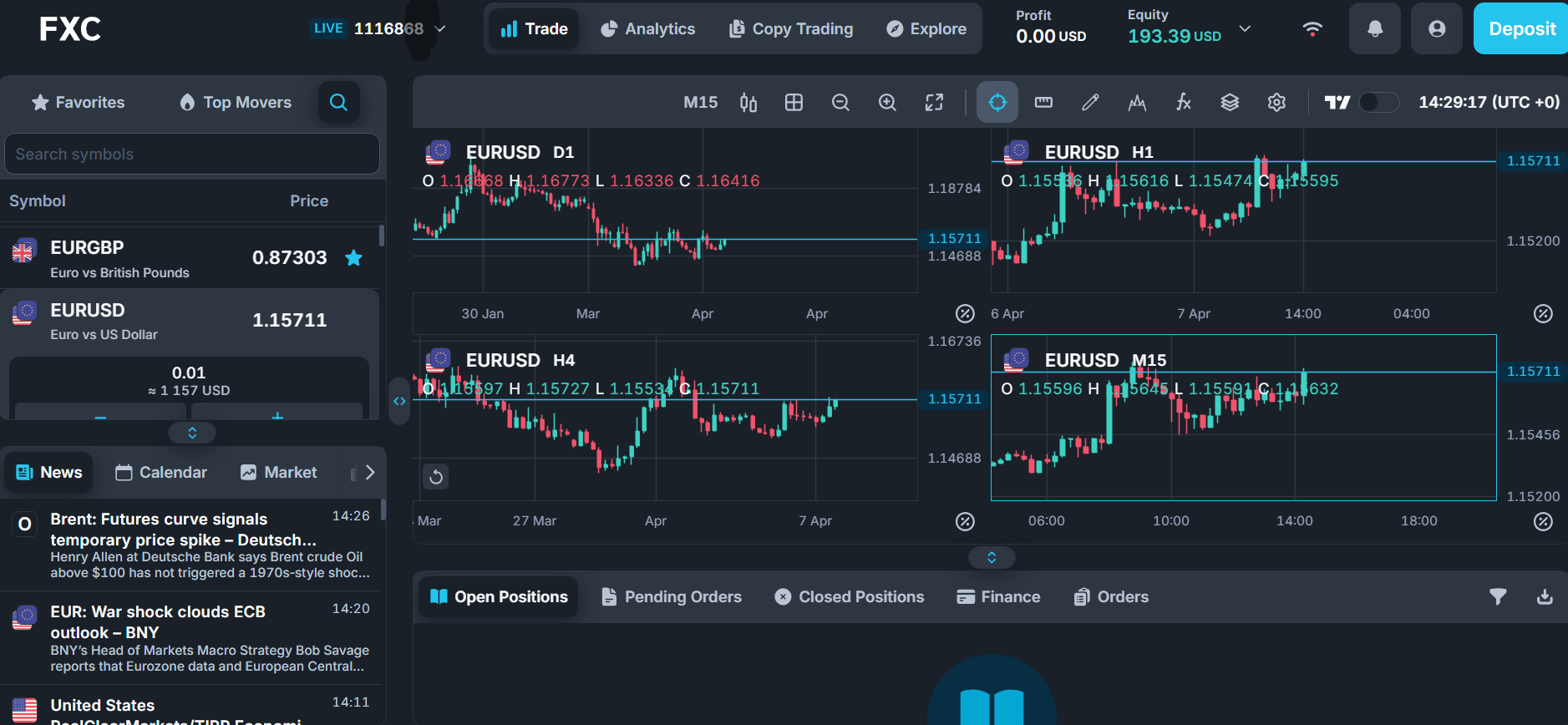
The WebTrader platform provides a clean, responsive interface with an easy-to-navigate layout, even for less experienced traders. They also offer a TradingView integration that enhances the charting experience, providing additional tools and improved visual analysis compared to the default interface.
Charting functionality is good, with the option to view multiple chart styles, alongside nine fixed timeframes ranging from one minute to monthly. Traders can use a range of standard technical indicators, including RSI, MACD, moving averages, Bollinger Bands, and Fibonacci tools, along with a full suite of drawing tools and annotations. Multi-chart layouts (up to four charts) on their default platform can be useful for traders monitoring multiple instruments or analysing multiple time frames for the same instrument. This is not available in the TradingView option.
The trading platform also integrates other tools, such as access to the latest news, market information, access to copy trading and an economic calendar at a glance.
However, more advanced trading features are limited. There is no support for custom indicators, scripting, or strategy backtesting, and the platform does not offer advanced tools such as depth-of-market or order-flow analysis.
Platform | Main takes |
FXCentrum WebTrader |
|
FXCentrum WebTrader - TradingView |
|
Additional trading tools
- FXCentrum offers copy trading through its proprietary ecosystem, which works on both WebTrader and its mobile app. You can browse a list of strategy providers, called “Money Managers,” and see important details like ROI, number of copiers, assets under management, minimum investment, and performance trends to help you choose.
The platform lets users invest in strategies and copy trades directly, with simple controls to start or stop copying. It also offers clear analytics, showing profit and loss, average wins and losses, trade summaries, and details of open and closed positions with entry and exit points.
Although the platform has good built-in features and performance tracking, it is a closed system. It does not connect with third-party copy trading platforms like ZuluTrade or Myfxbook, and it lacks social features such as discussion forums or externally verified results. The risk management and allocation tools are available, but they are more basic than those found on advanced portfolio-based copy trading platforms. - FXCentrum’s WebTrader platform also includes PAMM-style features, allowing investors to invest in master accounts managed by strategy providers. Important details like performance fees, the number of investors, account balances is displayed and access to your own account dashboard. MAM accounts aren’t available.
Education
- FXCentrum provides a reasonable base of educational content, though most of it is geared towards beginners and early-stage traders. The educational content is generally based on short video clips, with some eBooks, and lacks the depth seen in other brokers.
The short-form video content covers tutorials on navigating the platform, copy trading, technical indicators, and chart patterns. There are also videos covering an introduction to indicators such as RSI, moving averages, Fibonacci tools, breakout trading and basic market structure. The videos are easy to digest but as most videos are brief, typically under a minute, it limits depth.
In addition to video content, there are written guides and blog-style articles covering key trading concepts such as leverage, margin, risk management, and different trading styles. A downloadable eBook is also available, providing a more structured introduction to trading with FXCentrum, covering how to open an account, bonus types, and general market terminology.
FXC TV provides a short daily trade idea that typically lasts just a few minutes. The content focuses on a specific trading opportunity rather than detailed market analysis. The presenter shares technical analysis of the trade idea so traders can understand the rationale for the potential trade opportunity.
Other tools
- FXCentrum provides an economic calendar within its WebTrader platform, the FXC app, and on its website. The calendar displays upcoming events, previous figures, and forecasts.
The website version offers slightly less flexibility with filters, although there is the ability to view historical data (for a limited period) and adjust date ranges. While events can be grouped by impact level, there is no granular filtering by country, asset class, or specific event types, which reduces usability for more focused analysis. The FXC app and WebTrader does allow more options with filtering by impact level and affected currency. - The platform also features a continuously updated news feed across both the app and WebTrader, which is well integrated and delivers relevant market headlines directly within the trading environment. This stands out as one of the stronger elements of its research offering.
- Other tools are limited. A basic sentiment indicator is available, showing long vs. short positioning and simple price-range data, but it lacks depth compared to more advanced sentiment tools. There are no standalone trading calculators or VPS services available, and risk calculations are mostly confined to the order entry interface.
Trust: Offshore regulation with basic client protections
FXCentrum is regulated by the Financial Services Authority (FSA) of Seychelles. This offshore regulator provides a basic level of oversight; its investor protection is less stringent than that of top-tier regulators, and that’s why this is the worst performing category of the review. Still, the FSA requires brokers to maintain internal controls, including keeping client funds separate from company funds and adhering to compliance rules. In addition, FXCentrum also offers negative balance protection.
Regulated by FSA Seychelles (offshore jurisdiction)
Negative balance protection
Client fund segregation
Regulation tiers and alerts
Regulation tier | Country-entity | Specifics |
Low-tier regulation (minimal investor protection) | Seychelles, Financial Services Authority (FSA) | FXCentrum is a registered trademark of WTG Ltd. FSA License no. SD055 |
Other protection
- FXCentrum states that it provides negative balance protection to clients, meaning account balances will not fall below zero even during volatile market conditions. This is supported by references within its FAQ and Terms, although the exact implementation may depend on account conditions.
- Under FSA requirements, brokers are expected to maintain internal controls, including the segregation of client funds and operational capital.
- However, the overall protection framework remains limited. The broker does not offer investor compensation schemes or third-party insurance coverage in the event of insolvency.
Reputation
FXCentrum generally has a good reputation on major review sites. Users often mention how easy the website is to use and the ease of opening accounts. Many traders also appreciate the platform’s simplicity, helpful customer support, and the option for high leverage. Our own experience matches this, especially when it comes to using the platform and opening a live account.
However, there are some concerns to keep in mind. The UK’s Financial Conduct Authority has warned that this broker is not authorised to operate or promote its services in the UK. This could affect the confidence of users, especially those in regulated areas. Although this is about authorisation and not direct wrongdoing, it is still something people may wish to consider.
Issues have been raised with withdrawal experiences, especially when it comes to taking out profits or dealing with account conditions. These complaints seem to be mixed and not very common. Often, they are linked to certain account terms or promotions, rather than ongoing problems with the platform therefore it is important to understand the exact account terms. In any case, more transparency about pricing structures, execution model, promotions and fees would greatly contribute to improve the broker’s reputation.
Overall, the broker has good user ratings and has received some positive feedback from traders. Still, it’s important for traders to pay attention to the broker’s regulatory status and protections and make sure they understand all account conditions before they start trading. The terms and conditions are shown on account opening and traders may want to consider downloading a copy for reference.
Customer Service and Support: Broad access with some response delays
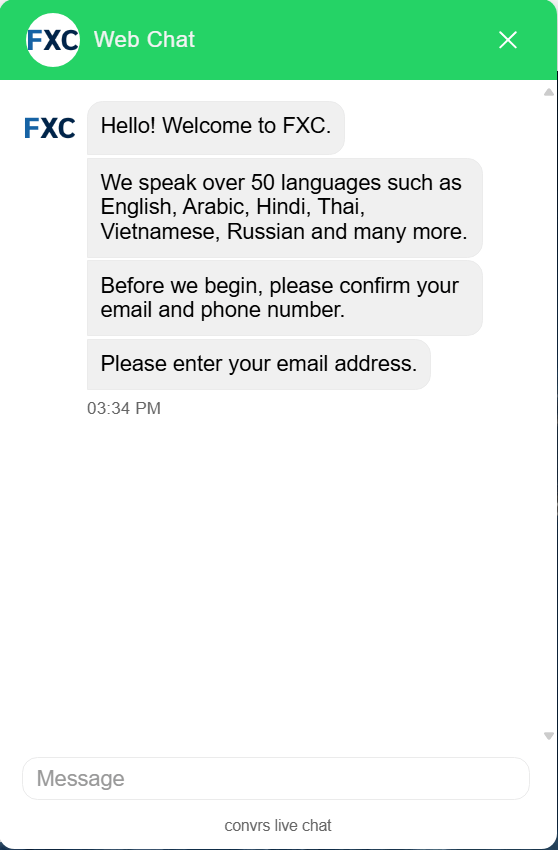
FXCentrum offers multilingual support across a range of channels, including live chat, email, phone, messaging apps, and social media, with support advertised as available 24/7. During testing, responses were generally professional and helpful, though this varied by agent. Email replies were quick and responses polite and well-detailed, while live chat was clear and useful when connected, though wait times of around 15 to 30 minutes to reach an agent were longer than expected.
There is also an FAQ section that can be filtered by topic, providing a useful place to find answers to common queries, which may be quicker than reaching out to the support team.
Wide range of support channels available
50+ languages supported (AI-assisted)
Helpful responses, but delayed response times
Support availability
FXCentrum provides access to customer support through multiple channels, including live chat, email, phone, contact forms (available in contact us), and messaging platforms such as WhatsApp, Telegram, Messenger, Line, and Viber. The broker also maintains a presence across social media channels, giving users several ways to get in touch.
Support is advertised as available 24/7, although availability can vary depending on time and demand. We found that even during core European trading hours, we waited over 15 minutes for a live agent, and this wait time extended considerably late into the US trading session. On occasions, multiple prompts were added to the chat to encourage a response from the agent and in one instance, a reply to a follow-up question remained unanswered, and the chat eventually closed.
FXCentrum states on its website that it supports over 50 languages, while its trading platform interface is available in 21. However, it is important to note that many translations are generated by AI, which may affect response quality.
Usefulness
During our testing, we found the support quality was generally good, with agents providing relevant information across most queries although the depth of responses varied by agent. Email responses were timely, with replies received within a few hours, and covered the questions asked, adding extra helpful details.
However, live chat performance was inconsistent. While responses were helpful once connected, wait times to reach an agent ranged between 15 and 30 minutes. Some questions were solved quickly once engaged with an agent with direct answers or useful links, while others required follow-ups or were not fully resolved. This was disappointing as live chat is usually faster and is important when you are looking for a quick response.
Based on our experience, overall the support team was polite and provided useful information, but they could improve their responsiveness to make the experience better for users.
User Experience: Fast onboarding with a simplified trading environment
FXCentrum delivers a smooth and straightforward user experience across its website, WebTrader platform, and mobile app. The journey from registration to live trading is quick, one of the quickest encountered with minimal friction during onboarding. The overall WebTrader design focuses on usability and clarity, making it easy for newer traders to navigate around while still offering enough functionality for more experienced users.
Fast account setup and onboarding process
Clean design with intuitive navigation
Strong mobile app
Web design and navigation
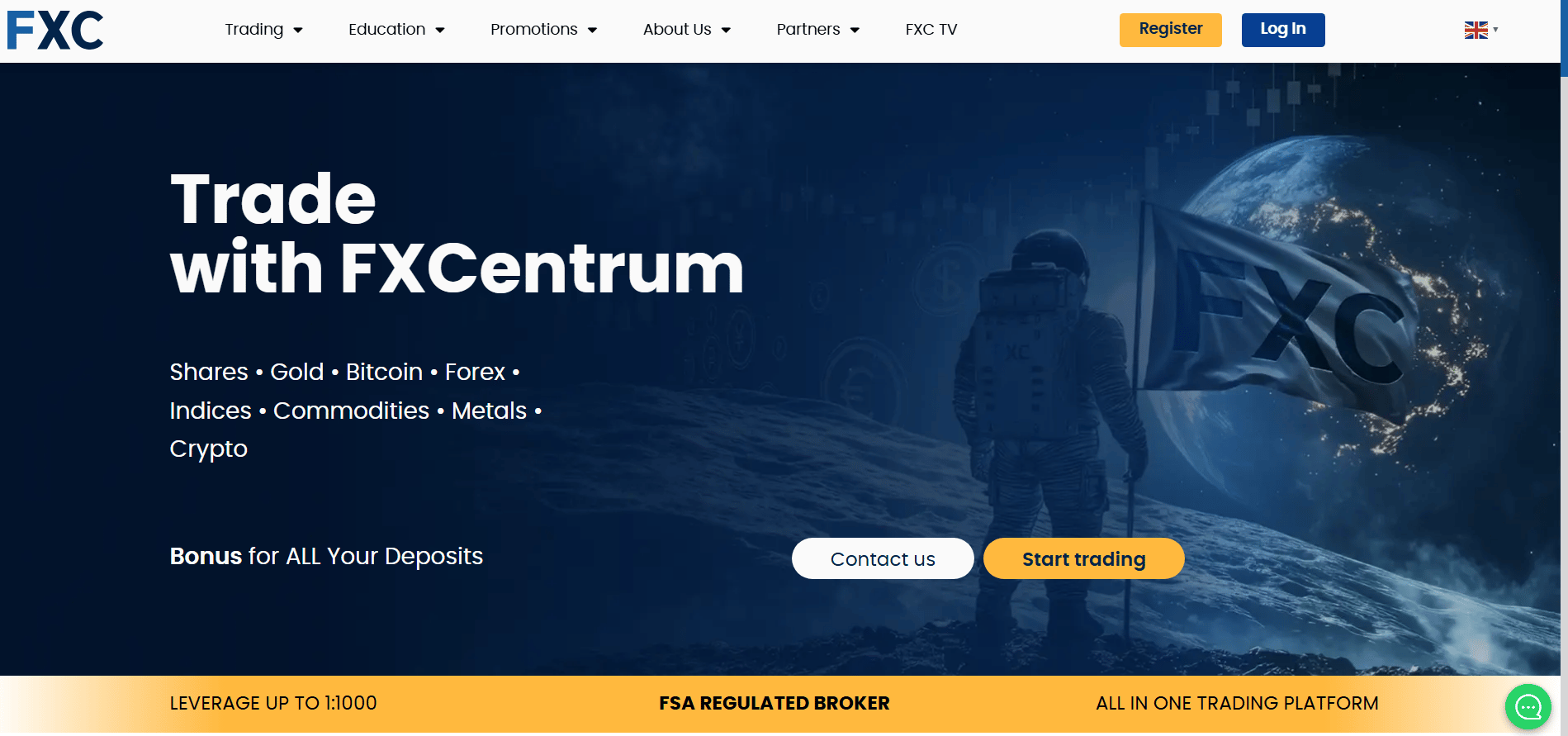
FXCentrum’s website has a clean and functional design that highlights key areas such as trading, education, promotions, and access to FXC TV for trade ideas. Core sections like account types, available trading platforms, and daily news are logically organised within sub-menus and are easy to navigate.
However, what is missing is access to trading costs, specifically looking at spreads. This can only be achieved by opening an account and accessing the FXC trading platform.
The registration process is very efficient, with the initial setup taking less than a minute as only basic information is required at the outset.
During testing, the website performed well, with fast loading times and no issues when moving between pages. The website is heavily focused on the bonus structures offered across the different accounts, although traders should read the finer details, such as withdrawal requirements, for each account. It does require a bit more digging through the site to obtain specifics.
Mobile App friendliness
The FXCentrum mobile app, FXC Trader is reliable and easy to use. Its layout is simple, so you can quickly find the information you are looking for. Navigation is handled through a lower menu, giving quick access to trading, portfolio management, market exploration, and analytics without unnecessary complexity.
The app integrates a range of features into a single environment. Traders can monitor live prices, execute and manage positions, and access built-in tools, including live market news with regular updates, an economic calendar, and copy trading.
Performance during testing was stable and responsive. Charts loaded quickly, and it’s easy to switch between their standard environment and the TradingView charts, which add a few extra analytical tools, although not as comprehensive as some platforms. Instrument switching was seamless, with no crashes or noticeable lag. Account management information is available through the app, and traders can view the account balance, equity, and open positions clearly.
For those looking at copy trading, there is a dedicated section in the app that details the strategy providers, along with metrics such as ROI, the number of copiers, and assets under management. It’s important to note that this is just headline information.
Overall, the app looks clean and is easy to read, with no excess clutter, although more advanced traders may prefer more customizable features.
Account opening process
Opening an account with FXCentrum is quick and uncomplicated. The initial registration requires only basic details, including name, email, date of birth, phone number, and password, along with selecting an account currency. This step takes less than a minute to complete, and once done the account is created almost instantly. Effectively, traders can access the WebTrader environment, deposit funds, and start trading straight away.
However, after registration, it is important that users complete their profile by providing additional details and uploading identification documents for full verification. While this step takes longer and the account is already active, it is necessary to enable traders to make withdrawals.
In testing, deposits were processed quickly, and verification was completed within 24 hours. Overall, the process is efficient and well-structured, allowing traders to move from sign-up to live trading with minimal delay.
Final Thoughts
FXCentrum keeps things simple, offering just two primary accounts, a straightforward WebTrader and App interface with core resources such as an economic calendar, live newsfeed, and copy trading integrated into the platform.
They provide a broad range of tradable assets, with access to over 350 instruments, although the majority are Stock CFDs. Depending on the account selected, traders can access high leverage of up to 1000:1, which will appeal to retail traders looking for flexibility and low barriers to entry.
Alongside its entry-level offering, the broker also provides a higher-tier account with a significantly larger minimum deposit of $10,000, aimed at more experienced traders seeking increased exposure. While the overall setup is straightforward, pricing is less competitive in places, which is something active traders will want to factor in.
The broker operates under an offshore regulatory framework through the Financial Services Authority (FSA) of the Seychelles which offers a basic level of oversight, meaning protections are more limited compared to top-tier jurisdictions, although segregated funds and negative balance protection are in place.
Support is available 24/7 although wait times on live chat were consistently above 15 minutes to connect with a live agent the responses generally were helpful. The onboarding and funding experience is quick and efficient. However, the broker places a strong emphasis on bonus-driven accounts, and the associated terms and conditions can impact withdrawals if not fully understood. Withdrawals also have fee implications, especially when making multiple withdrawals per month or closing an account within the first 30 days.
Overall, FXCentrum is best suited to beginners or traders who prioritise ease of use over advanced tools and institutional-grade pricing. More experienced traders may find value in the higher-tier account, but should weigh this against the broker’s regulatory standing and cost structure. The bonus model is a key consideration, as trading requirements and withdrawal conditions can affect realised profits, so it’s important to approach these features with a clear understanding before committing.
FXCentrum FAQs
Authors
Louise Carr
Louise Carr is an experienced Futures and Forex trader/analyst with over 15 years in the financial markets. Her career began in 2009 after transitioning from a successful role in financial services.

Xevi Fontdeglòria
Xevi Fontdeglòria is the Managing Editor at FXStreet, and he joined the team in 2023 after more than a decade of experience covering financial markets as a reporter and editor for first-tier media outlets such as Dow Jones newswir